上海煜企智能科技有限公司 - IT弱電智能化系統集成整體解決方案提供商
When Windows 11 26H1 September updates affect RDP or RDS, verify scope and KB applicability, pilot the fix, and read back the real workload before widening the change.
]]>上海煜企智能科技有限公司 - IT弱電智能化系統集成整體解決方案提供商
When a team reports that some users can connect to Remote Desktop while others cannot, the first response is often the riskiest one: roll back or restart every server at once. That can erase the timeline you need to understand the incident.
Microsoft’s September 2026 release-health information describes a Windows 11 26H1 issue in which some organizations could see RDS instability, RDP connection or sign-in failures, and server hangs after the security update. Microsoft also documents an out-of-band update, KB5129194, for the RDS-related problem. The useful lesson is not to memorize a KB number; it is to connect the patch, the session, and the workload in one evidence trail.
The short answer: do not roll back the whole estate first
Verify that the affected systems match the documented scope. Then test the remediation on one non-critical session host or a low-risk user group. Widen the change only after the pilot has passed, the business path has been tested, and the change record is complete.
Use this order:
- Scope the incident: one host, one account, or every RDS session? Is the behavior different inside and outside the network?
- Verify the build and KBs: confirm the Windows release, build, installed updates, and installation time.
- Pilot the remediation: evaluate KB5129194 against the affected baseline before broad deployment.
- Read back the real workload: test the application, file access, printing/audio where relevant, and reconnect behavior—not just the login screen.
01 | Separate connection failure from workload failure
Classify the symptom before choosing a fix:
- The connection never starts: authentication, gateway, port, or network-path behavior may be involved.
- The session opens and then stalls: the desktop, application, or mapped resource may not be completing initialization.
- Only some users are affected: compare users, endpoints, policies, and session-host placement instead of assuming a global outage.
- A server hangs after the update: preserve the timeline and logs before repeated restarts overwrite useful evidence.
At minimum, record the host or asset group, affected users and endpoints, first-seen time, Windows build, recent KBs, visible RDP behavior, and whether the symptom can be reproduced. Without that baseline, a successful reconnect can be mistaken for a complete recovery.
02 | Verify the build and patch baseline
The Microsoft notice applies to a particular release and update combination. Check the following before changing anything:
- whether the host is Windows 11 26H1 or otherwise within the documented scope;
- whether KB5124012 applies and when it was installed;
- whether KB5129194 applies and whether it is already present;
- whether session hosts, jump servers, and office endpoints share the same patch baseline.
Start with Windows Update history and winver for a manual check. For a larger estate, use the organization’s existing asset or patch-management export. This article does not claim to have executed commands in your environment; the validation path still needs to be run against your own inventory.
03 | Put KB5129194 in a pilot, not a blind rollout
Microsoft Support lists KB5129194 as an out-of-band Windows 11 26H1 update released on September 14, 2026, addressing the documented RDS instability and RDP connection/sign-in failure scenario. The same page also lists other known issues, so the update should not be treated as a universal fix for every Remote Desktop symptom.
A controlled pilot looks like this:
- Select one non-critical session host or a low-risk account group, and capture the current build, KB list, configuration, and symptom.
- Confirm the maintenance window, restart requirement, rollback path, and business owner before deployment.
- After remediation, create a new session from both the internal network and a representative office endpoint; perform a disconnect/reconnect test.
- Validate the application, file access, printing or audio if used, and the relevant event records.
If the pilot does not recover the path, stop widening the change. Preserve event logs, update history, and the change timeline before escalating. “Restart it again” is not a substitute for evidence.
04 | Four questions to confirm before a wider change
- 01 Scope: Which hosts, endpoints, users, and business windows are affected?
- 02 Baseline: Can the before/after build, KB, logs, and connection behavior be compared?
- 03 Stop line: Who decides to stop, roll back, or change the policy when the pilot fails?
- 04 Workload readback: Have login, application, files, printing/audio, and reconnect all been verified?
Fast-looking actions that increase the risk
- Disabling every security update as soon as RDP fails turns a scoped incident into a patch-baseline problem.
- Installing or uninstalling the KB everywhere before verifying the affected release treats different hosts as if they had the same fault.
- Checking only “I can log in” misses the application and resource path that users actually need.
- Copying an unreviewed registry script from a forum creates a change with no reliable rollback evidence.
What Yuqi can deliver around this problem
Yuqi’s enterprise IT operations and infrastructure hosting service can turn a post-update incident into a controlled change loop: inventory the affected assets and patch baseline, separate server/network/endpoint/application layers, schedule a pilot window, capture before-and-after evidence, and read back the critical workload with follow-up observations. The public checklist above is a starting sequence; the actual response still depends on the release, topology, and business window.
Sources and limits
- Microsoft Learn: Windows 11 26H1 known issues and notifications
- Microsoft Support: KB5129194—Windows 11 26H1 security update
- Microsoft Learn: Prepare for Windows 11
This article summarizes public Microsoft documentation. It does not claim that the fix has been tested in your environment; verify applicability, restart impact, and rollback controls through your own change process.
]]>上海煜企智能科技有限公司 - IT弱電智能化系統集成整體解決方案提供商
Windows 11 26H1 9月更新后出現 RDP 連接或登錄異常時,先核對適用范圍、補丁和試點回讀,再決定擴大或回滾。
]]>上海煜企智能科技有限公司 - IT弱電智能化系統集成整體解決方案提供商
如果辦公室里突然出現“有人能連、有人連不上”,或者遠程桌面登錄后卡住,最危險的動作不是先查原因,而是把所有服務器一起回滾、重啟或改注冊表。
2026 年 9 月,Microsoft 記錄過 Windows 11 26H1 安全更新后部分組織出現 RDS 不穩定、RDP 連接或登錄失敗、服務器掛起等現象。官方頁面同時說明,帶外更新 KB5129194 已針對這類 RDS 問題提供修復。這里的關鍵不是記住一個 KB 號,而是把“補丁—會話—業務”三件事串起來,留下可回讀的證據。
先給結論:別先全網回滾
先確認你的系統是否真的屬于受影響范圍,再用一臺非關鍵設備或一個低風險會話做試點。只有在試點恢復、業務驗證和變更記錄都完成后,才決定擴大修復范圍。
這篇文章給企業 IT 負責人的,是一張四步排查順序:
- 確認影響范圍:是單臺服務器、一個賬號,還是所有 RDS 會話?內網和外網是否一樣?
- 核對系統與 KB:確認 Windows 版本、構建號、已安裝更新和安裝時間,不要只憑“昨天更新過”判斷。
- 先做試點修復:按 Microsoft 官方修復路徑評估 KB5129194,先在可回退的范圍驗證。
- 回讀真實業務:不只看“能登錄”,還要看應用、文件映射、打印/音頻、斷線重連和事件記錄。
01|先分清:連接失敗,還是業務會話失敗
把故障分成四類,排查會快很多:
- 根本連不上:客戶端報錯、認證失敗、端口或網關鏈路異常。
- 能登錄但卡住:會話建立了,但桌面、應用或資源加載不完整。
- 一部分人受影響:可能與用戶、終端版本、策略或會話主機分布有關。
- 更新后服務器掛起:優先保護現場、記錄時間線,不要先批量重啟覆蓋證據。
建議至少記錄:服務器名或資產編號、用戶/終端范圍、首次發生時間、Windows 構建號、最近安裝的 KB、RDP 錯誤表現和是否能復現。沒有這組最小證據,后面的“修復成功”很容易只是一次偶然重連。
02|核對系統、構建號和補丁,不要只看更新時間
Microsoft 的公告針對的是特定版本和更新組合。企業應逐臺或按資產組確認:
- 是否是 Windows 11 26H1 或公告涉及的系統范圍;
- 安全更新 KB5124012 是否適用、何時安裝;
- 帶外修復 KB5129194 是否適用、是否已安裝;
- 服務器、會話主機、跳板機和終端是否處在同一個補丁基線。
可以先用 Windows 的“設置 → Windows 更新 → 更新歷史記錄”和 winver 做人工核對;如需批量盤點,再由管理員使用現有資產或補丁管理工具導出清單。本文沒有在你的環境里執行這些命令,因此這里只引用官方排查方向,不把命令寫成“已經跑通”。
03|把 KB5129194 放進試點,而不是直接推全網
官方 Support 頁面顯示,KB5129194 是 2026-09-14 發布的 Windows 11 26H1 帶外更新,針對 RDS 不穩定、RDP 連接/登錄失敗等問題提供修復;官方頁面也列出了其他已知問題,不能把它理解成“安裝后所有遠程桌面問題都會消失”。
一個可控的試點順序是:
- 選一臺非關鍵會話主機或一組低風險賬號,先保存當前補丁和配置證據。
- 安裝/部署前確認維護窗口、重啟條件、回退路徑和業務聯系人。
- 修復后分別從內網和實際辦公終端建立新會話,做一次斷線重連。
- 觀察應用、文件共享、打印或音頻等企業實際使用項,不只看桌面是否出現。
如果試點未恢復,先停止擴大范圍,保留事件日志、更新歷史和變更時間線,再進入專項排查。不要用“再重啟一次”替代證據。
04|發布變更前,項目負責人逐項確認
- 01 影響對象:哪些服務器、終端、用戶和業務時段受影響?
- 02 證據基線:更新前后的版本、KB、日志、連接表現是否可對比?
- 03 回退邊界:什么情況下停止擴大,誰批準回滾或改動策略?
- 04 業務回讀:遠程登錄、應用、文件、打印/音頻和斷線重連是否都驗證?
哪些做法看起來快,實際會放大風險
- 一看到 RDP 失敗就禁用全部安全更新;這會把一個版本問題擴大成補丁基線問題。
- 未確認受影響版本就批量安裝或批量卸載 KB;不同主機可能不是同一個故障。
- 只驗證“我能登錄”,不驗證業務應用和用戶實際路徑;這會把部分恢復誤報成全量恢復。
- 直接復制網上注冊表腳本;沒有回退證據,也無法說明改動對其他主機的影響。
煜企能把這件事落到什么程度
煜企的企業 IT 運維外包與基礎設施托管服務可以把這類更新后的異常整理成可執行的變更閉環:先做資產和補丁范圍盤點,再按服務器/網絡/終端/應用分層定位,安排試點窗口,記錄變更前后證據,最后回讀關鍵業務并留下后續觀察項。文章里的方法是公開排查順序,實際環境仍要按系統版本、網絡拓撲和業務時段單獨判斷。
資料來源與邊界
- Microsoft Learn:Windows 11 26H1 known issues and notifications
- Microsoft Support:KB5129194—Windows 11 26H1 security update
- Microsoft Learn:Prepare for Windows 11
本文按官方公開頁面整理,不代表你的環境已經實測修復;KB 適用性、重啟影響和回退方式請以實際系統與變更審批為準。
]]>上海煜企智能科技有限公司 - IT弱電智能化系統集成整體解決方案提供商
A red signal in a monitoring console does not mean that someone has taken action. This guide defines the minimum fields for ownership, first response, escalation and closure evidence in a small-business IT alert loop.
]]>上海煜企智能科技有限公司 - IT弱電智能化系統集成整體解決方案提供商
Many monitoring channels show red signals every day, yet nobody can answer the practical questions when one matters: what business impact does it represent, who owns the first response, what should happen first, and what evidence allows the event to be closed?
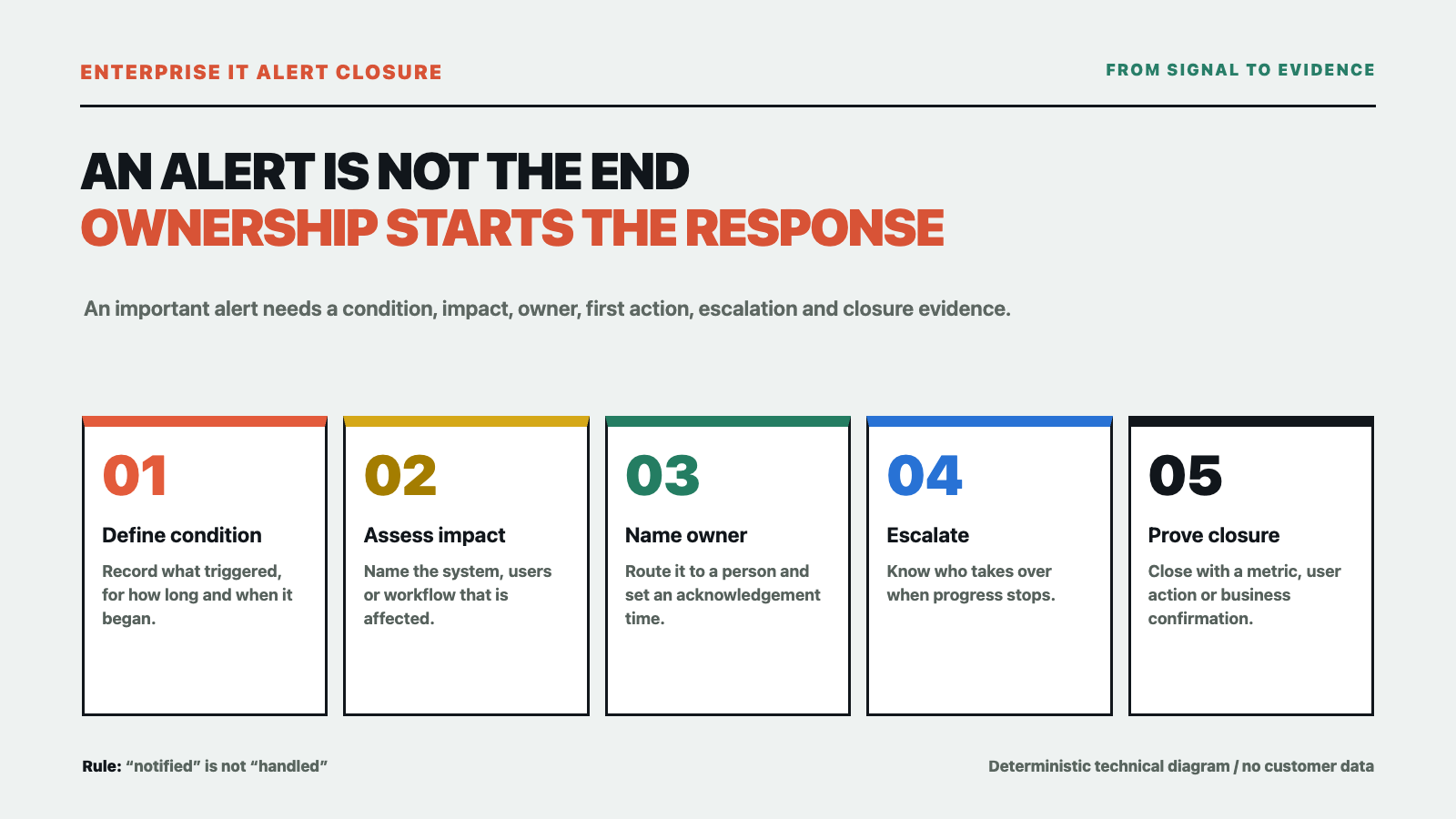
“The monitoring system raised an alert” only means that a condition was triggered. It does not mean that someone accepted the work. Without an owner, a response channel, an escalation route and closure evidence, more alerts simply become background noise. Enterprise IT alert closure is about moving each important signal to a reviewable result.
Separate a signal from an event that needs action
Not every monitoring signal should wake someone immediately. Start with three groups: observations that only need recording, risks that should be handled during working hours, and events that require immediate response because they affect a business workflow. The level should be based on business impact and acceptable recovery time, not only on a color or a threshold.
For example, a short increase in interface latency without user impact may only need a record. If the same symptom affects sign-in, orders or internal collaboration, it needs an owner and a first action. These are not universal product thresholds or customer measurements. Each business should define conditions based on its workflows, dependencies and maintenance windows.
Keep at least nine fields for an important alert
First, record the trigger condition: what was checked, for how long, and when it started. Second, describe the business impact: which system, users or workflow are affected and whether the impact is expanding. Third, assign a severity—observation, working-hours response or immediate response—and record the reason.
Fourth, name an owner, rather than only a department. Fifth, specify the notification channel and acknowledgement action: where the alert goes and when it escalates without confirmation. Sixth, write the first action: which log to inspect, which dependency to check, which change to pause or which data to protect first.
Seventh, prepare an escalation route: who takes over if the owner does not respond, and how network, application, supplier or business teams are involved. Eighth, define closure evidence: a metric has recovered, a business action succeeds, a change has been rolled back, or an accountable business owner confirms the impact has ended. Ninth, keep a review date and conclusion: whether thresholds, deduplication, capacity, permissions or runbooks need adjustment.
These fields do not require a complex platform on day one. A shared table or service-desk form can expose gaps faster than leaving every alert in a chat stream.
Run the loop in three layers
Layer one: reduce noise without hiding risk
Group repeated notifications from the same underlying event and use sensible suppression, cooldown and maintenance windows. Keep the original event and the reason for grouping so that a reduction in messages does not become a loss of traceability.
Layer two: route to a named owner
An alert notification should include the system, impact, severity, owner, first action and acknowledgement time. Microsoft’s Azure Monitor documentation connects alert rules with action groups, notifications and actions, and provides a way to test an action group. That is a useful reminder that a trigger condition and a notification action are separate design and verification steps; configuring one does not automatically create ownership.
Layer three: close with evidence
“Handled” and “it should be back” are not sufficient closure records. Attach at least one reviewable item: the recovery range of a metric, a successful minimum business action, a completed rollback or confirmation from the business owner. If the result cannot yet be verified, write “mitigated; root cause pending” instead of closing it just to make the list green.
Start with a small rehearsal
Do not redesign every monitor at once. Pick one existing alert with a controllable impact, complete the nine fields and run a rehearsal in an approved window: trigger or replay the event, confirm that the message reaches the intended person, record the first action, take the escalation route if progress stops, and finish with a minimum validation action by a system or business user.
At the end, answer four questions: did the alert reach the right person; did that person know the first action; can escalation find the next owner; and is the closure evidence understandable to the business? Any unanswered question is a loop gap, not a reason to label monitoring “complete.”
When more monitoring is the wrong next step
If current alerts have no owner, maintenance window, required permission or dependency map—or if the business has never participated in acceptance—adding more rules usually adds more noise. Google’s SRE enterprise roadmap warns about alerting on causes without a clear user-visible symptom. NIST incident-handling guidance likewise treats detection, analysis, response and lessons learned as one chain. Monitoring is not the endpoint; the value is enabling the right action.
What Yuqi can support
Yuqi can review an existing server, network, virtualization and application environment and help structure alert categories, ownership boundaries, notification and escalation paths, on-call records, change correlation and closure acceptance into handoff-ready IT operations documentation and workflows. The scope depends on the environment, permissions, business impact and agreed service boundary. We do not promise zero alerts, a fixed response time or automatic resolution of every event.
If you need to understand why alerts are not being owned, see Yuqi’s enterprise IT operations and infrastructure hosting service and start with one alert class and one nine-field record instead of buying more monitoring tools first.
Sources: Microsoft Azure Monitor Action groups, Create a metric alert, NIST Computer Security Incident Handling Guide, and Google SRE Enterprise Roadmap. This is general enterprise IT planning information, not a monitoring configuration, incident-response audit or service guarantee. It contains no customer measurements or vendor endorsement.
]]>上海煜企智能科技有限公司 - IT弱電智能化系統集成整體解決方案提供商
監控系統有紅點,不等于有人接手。本文從告警條件、影響、等級、負責人、首次動作、升級和關閉證據出發,給出一套中小企業可以先落地的 IT 告警閉環。
]]>上海煜企智能科技有限公司 - IT弱電智能化系統集成整體解決方案提供商
監控群里每天都有紅點,真正需要追問時,卻常常沒人能馬上回答:這是哪個業務的影響?誰先接手?第一步做什么?什么時候算處理完成?
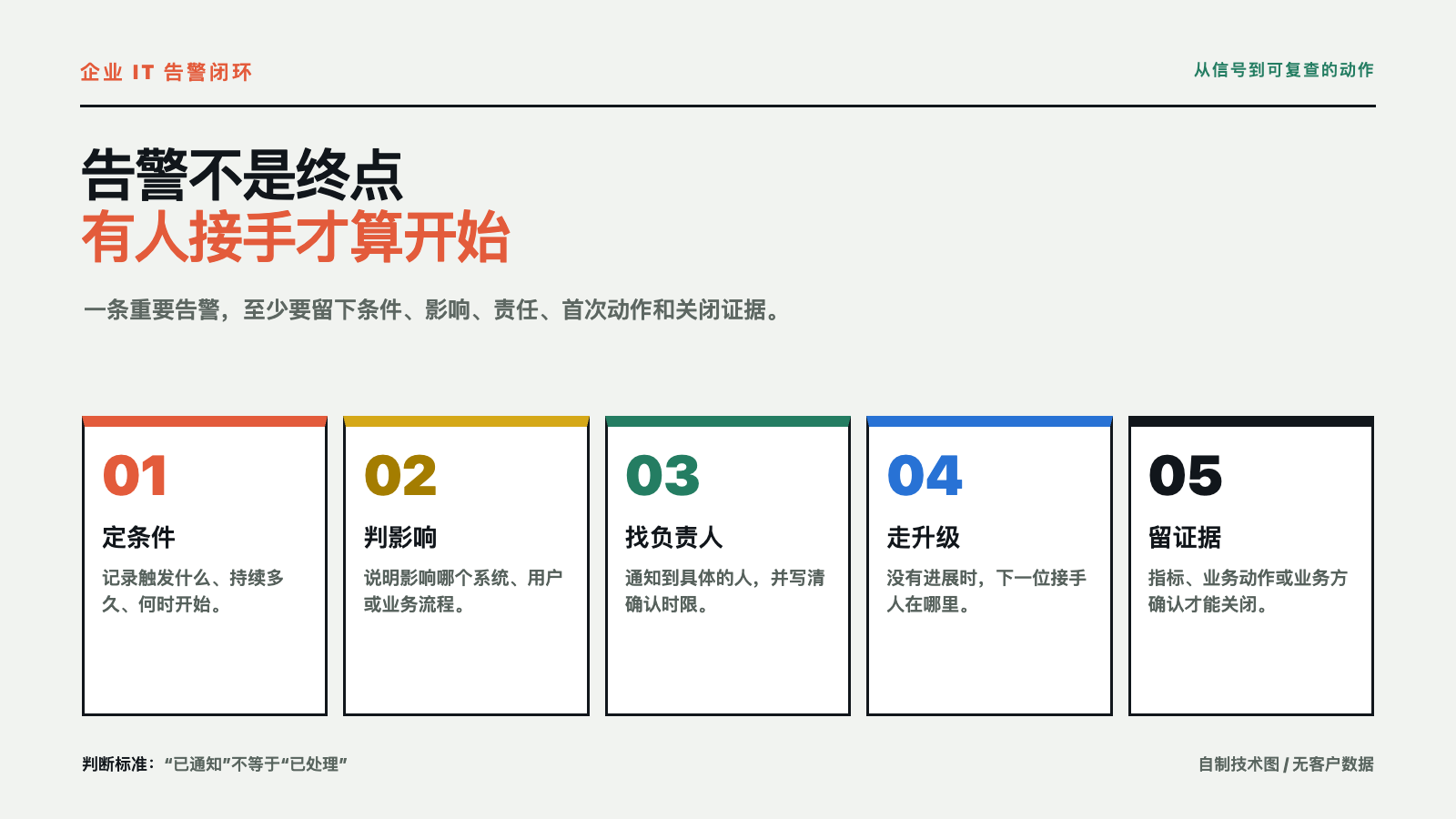
“系統發出了告警”只說明某個條件被觸發,不等于動作已經發生。沒有責任人、處理渠道、升級路徑和關閉證據,告警越多,越容易被當成背景噪聲。企業 IT 告警閉環要解決的不是讓屏幕變得更紅,而是讓每個需要關注的信號都能走到一個可復查的結果。
先區分“信號”與“需要動作的事件”
不是每一條監控信號都應該立即叫醒一個人。先把信號分成三類:只需要記錄的觀察項、需要在工作時間處理的風險項、需要立即響應的業務影響項。分級依據應當來自業務影響和可接受的恢復時間,而不是單純看顏色或閾值大小。
例如,同一個接口延遲升高,如果沒有用戶影響、持續時間很短,可能只需要記錄;如果已經影響登錄、訂單或內部協作,就需要明確負責人和首次動作。這里不預設某個產品的閾值,也不把示例當成客戶現場的實測規則。企業應按自身業務、依賴關系和維護窗口定義條件。
每條重要告警至少留下九個字段
第一,記錄觸發條件:監控檢查了什么,連續多久,何時開始。第二,寫清業務影響:影響哪個系統、用戶或關鍵流程,當前是否仍在擴大。第三,標出等級:觀察、工作時間處理,還是需要立即響應,并說明依據。
第四,指定負責人,而不是只寫一個部門名稱。第五,規定通知渠道和確認動作:發到哪里,多久沒有確認就升級。第六,寫出首次動作:查看哪項日志、確認哪個依賴、暫停哪個變更,或者先保護哪份數據。
第七,準備升級路徑:負責人無響應時交給誰,涉及網絡、應用、供應商或業務方時怎樣轉交。第八,定義關閉證據:指標恢復、業務動作通過、變更已回退,還是業務負責人確認影響結束。第九,留下復盤日期和結論:是否需要調整閾值、去重規則、容量、權限或運行手冊。
這九個字段不要求一開始就做成復雜平臺。先用一張共享表或服務臺字段跑通一周,也比把所有告警繼續堆在聊天窗口里更容易發現缺口。
用三層動作把閉環跑起來
第一層:減少噪聲,但不隱藏風險
把同一根因造成的重復通知合并,設置合理的抑制、冷卻和維護窗口;同時保留原始事件,避免為了“少響一點”把真正的影響一起吞掉。每一條被合并的告警,都要能追溯到原始條件和合并理由。
第二層:從部門名改成具體認領
告警通知里至少要有系統、影響、等級、負責人、首次動作和確認時限。Azure Monitor 官方文檔把告警規則與 action group、通知和動作連接起來,并提供測試 action group 的路徑;這說明“觸發條件”和“通知動作”是兩個需要分別設計和驗證的環節,不是配置一次就自動形成責任制。
第三層:把關閉寫成證據
“已經處理”“應該恢復了”都不是足夠的關閉記錄。關閉時至少附一項可復查證據:指標恢復到什么范圍、哪個業務動作重新成功、哪次變更完成回退、誰確認影響結束。對無法驗證的事件,狀態可以寫“緩解完成、根因待查”,不要為了讓列表變綠而提前關閉。
一次小范圍演練怎么開始
不要一上來改全套監控。先挑一種真實存在、但影響范圍可控的告警,補齊九個字段,指定一個工作時段做演練:觸發或回放事件,確認通知是否到達;由負責人認領并記錄首次動作;如果在約定時間內沒有進展,走一次升級;最后讓業務或系統使用者完成一個最小驗證動作。
演練結束只回答四個問題:告警有沒有到對的人?對方是否知道第一步?升級是否真的能找到下一位?關閉時有沒有業務可理解的證據?任何一項答不上來,都應該記錄為閉環缺口,而不是寫成“監控已完善”。
什么時候不要急著加更多監控
如果現有告警沒有負責人、沒有維護窗口、沒有必要權限、沒有服務依賴圖,或者業務方從未參與驗收,繼續增加規則往往只會增加噪聲。Google SRE 的企業路線資料把“對原因告警、卻沒有明確用戶可感知癥狀”列為需要警惕的模式;NIST 的事件響應指南也把檢測、分析、響應和復盤放在同一條處理鏈上。監控不是終點,能否讓人采取正確動作才是運維流程的價值。
煜企能承接什么
煜企可以圍繞企業現有的服務器、網絡、虛擬化和應用環境,協助梳理告警分類、責任邊界、通知與升級路徑、值守記錄、變更關聯和關閉驗收,整理成可交接的 IT 運維文檔與執行流程。具體范圍要以現有系統、人員權限、業務影響和雙方確認的服務邊界為準,不承諾零告警、固定響應時間或所有事件自動解決。
如果你要先判斷“告警為什么總是沒人接”,可以查看煜企企業 IT 運維與基礎設施托管服務,從一類告警和一張九字段表開始,而不是先采購更多監控工具。
資料來源:Microsoft Azure Monitor Action groups、Create a metric alert、NIST Computer Security Incident Handling Guide 和 Google SRE Enterprise Roadmap。本文是一般性企業 IT 規劃信息,不構成具體監控配置、事故響應審計或服務承諾;沒有客戶實測數據或廠商背書。
]]>上海煜企智能科技有限公司 - IT弱電智能化系統集成整體解決方案提供商
A green backup job does not prove that a business can recover. This guide turns a small, isolated recovery rehearsal into a testable path from backup targets to data, application, permission and business validation.
]]>上海煜企智能科技有限公司 - IT弱電智能化系統集成整體解決方案提供商
Many businesses see a green backup console every morning, yet nobody can answer three questions when a file, virtual machine or business system must be restored: which point in time should be recovered, who will execute the work, and how will the business validate the result?
A successful backup job only means that a scheduled job completed. It does not automatically prove that files are complete, a database can start, application configuration is available, permissions are preserved or the recovery owner knows the next step. A small, isolated and reversible recovery rehearsal is a better way to test whether a backup supports the business.
Define what “recovery” must achieve
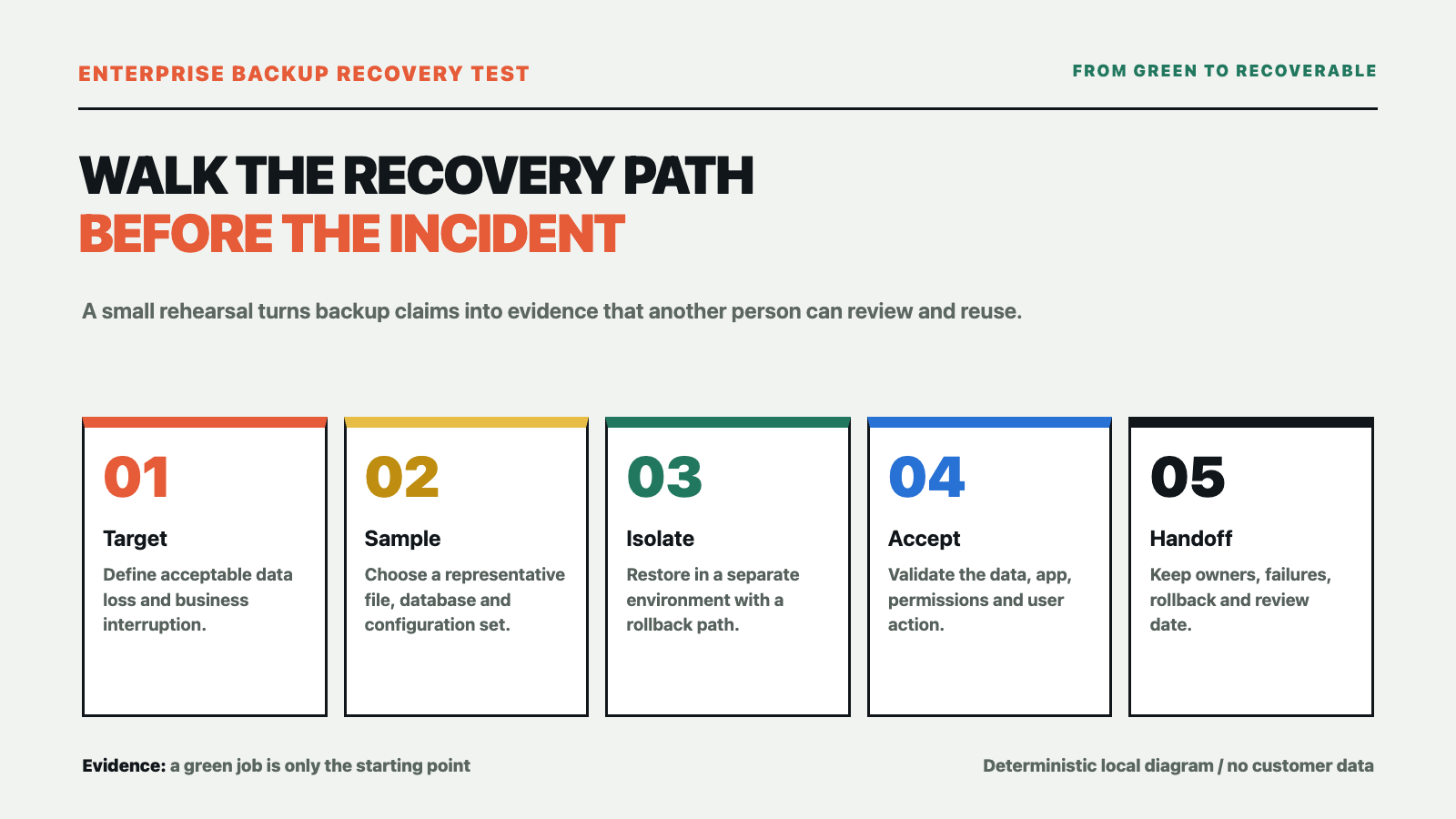
A recovery rehearsal should not end when a file is copied out. Start with two business-readable targets: how much data loss is acceptable, and how long the business can tolerate an interruption. These are commonly described as RPO and RTO. They are not fixed properties of a device; they are decisions shaped by orders, finance, production, customer service and available staff.
A shared folder may be allowed to recover to the previous evening, while an active order workflow may require a more recent point. Restoring one file and restoring a complete business system also have different time targets. Without targets, backup frequency, retention, storage location and recovery method are configured by intuition.
Select a small sample that someone can accept
The first round does not need to move the whole production environment. Select representative samples: a frequently used folder, a database backup, application configuration, network or virtualization configuration and a recovery note. Include normal data and a small number of older, unusual or permission-sensitive items.
Record the sample time, backup version, file count, key fields and original permissions. That creates a comparison point after the restore instead of relying on “the file opened.” Minimize customer, contract and employee information; use sanitized samples whenever possible.
Restore in an isolated environment
A rehearsal needs an isolated environment, an approved window and a rollback path. Put restored files, databases or virtual machines somewhere separate from production. Confirm that the test cannot overwrite live data or trigger production jobs through shared network paths, accounts or schedules.
Write down the participants before the window starts: who approves it, who executes the restore, who validates data and who decides whether the business can continue. NIST contingency-planning guidance treats recovery procedures, roles and plan testing as part of continuous improvement. For a small business, the minimum useful record is still who did what, when, and with which result.
Validate more than the file
Check the result at four levels:
- Data. Do file counts, sizes, versions, key fields and integrity checks match the sample?
- Configuration. Can the application configuration, dependent services, certificates and scheduled jobs be found, and is there a documented fix for anything missing?
- Permissions. Can the right people access the result while unauthorized access remains blocked? Do not open every permission merely to make a test pass.
- Business. Can a real user complete a minimum business action, such as finding a record, generating an internal report or completing an approval? Do not stop at “IT can see the service running.”
If one layer fails, do not label the rehearsal “recovery successful.” Record a more precise result, such as “data restored; application repair pending” or “files available; permissions pending,” then decide whether to expand backup scope, add configuration protection or redesign the recovery path.
Leave a record that the next person can reuse
Keep the rehearsal date, recovery target, sample version, operator, validator, elapsed time, failure points, rollback action and next review date. NIST’s recent backup guidance also emphasizes creating, testing and reviewing backups during recovery exercises. The record is not for a polished report; it lets another person take over when the usual recovery owner is unavailable.
Yuqi can help review an existing server, file, database or virtualization environment and turn it into a handoff-ready recovery path: critical-data inventory, RPO/RTO targets, backup scope, isolated restore environment, rehearsal steps and acceptance records. The final plan depends on the environment, data change rate, acceptable interruption and the scope agreed by both parties. We do not promise zero downtime or a fixed recovery time.
If you need to check whether an enterprise backup can actually support recovery, see Yuqi’s disaster recovery and backup solution and start with a recovery target and a small sample instead of counting green backup jobs.
Sources: NIST SP 1339, OT Backup Quick Start Guide; NIST SP 800-34 Rev. 1, Contingency Planning Guide; and the NIST NCCoE guide on protecting and testing backup files. This is general enterprise IT planning information, not a disaster-recovery audit or legal advice. It contains no customer measurements or vendor endorsement.
]]>上海煜企智能科技有限公司 - IT弱電智能化系統集成整體解決方案提供商
備份軟件顯示任務成功,不等于業務真的能恢復。本文用一場小范圍恢復演練,說明如何確定恢復目標、選擇樣本、隔離環境、驗收數據和留下責任記錄。
]]>上海煜企智能科技有限公司 - IT弱電智能化系統集成整體解決方案提供商
很多企業的備份控制臺每天都是綠色,真正要找一份文件、恢復一臺虛擬機或接回一個業務系統時,卻沒有人能確認三件事:恢復到哪個時間點、誰來執行、恢復后業務怎么驗收。
備份任務成功,只能說明某個任務按計劃結束。它不自動證明文件內容完整、數據庫能啟動、應用配置還在、權限關系沒丟,也不證明負責恢復的人知道下一步做什么。判斷備份是否有用,最好安排一次小范圍、隔離、可回退的恢復演練。
先確定“恢復到什么程度”
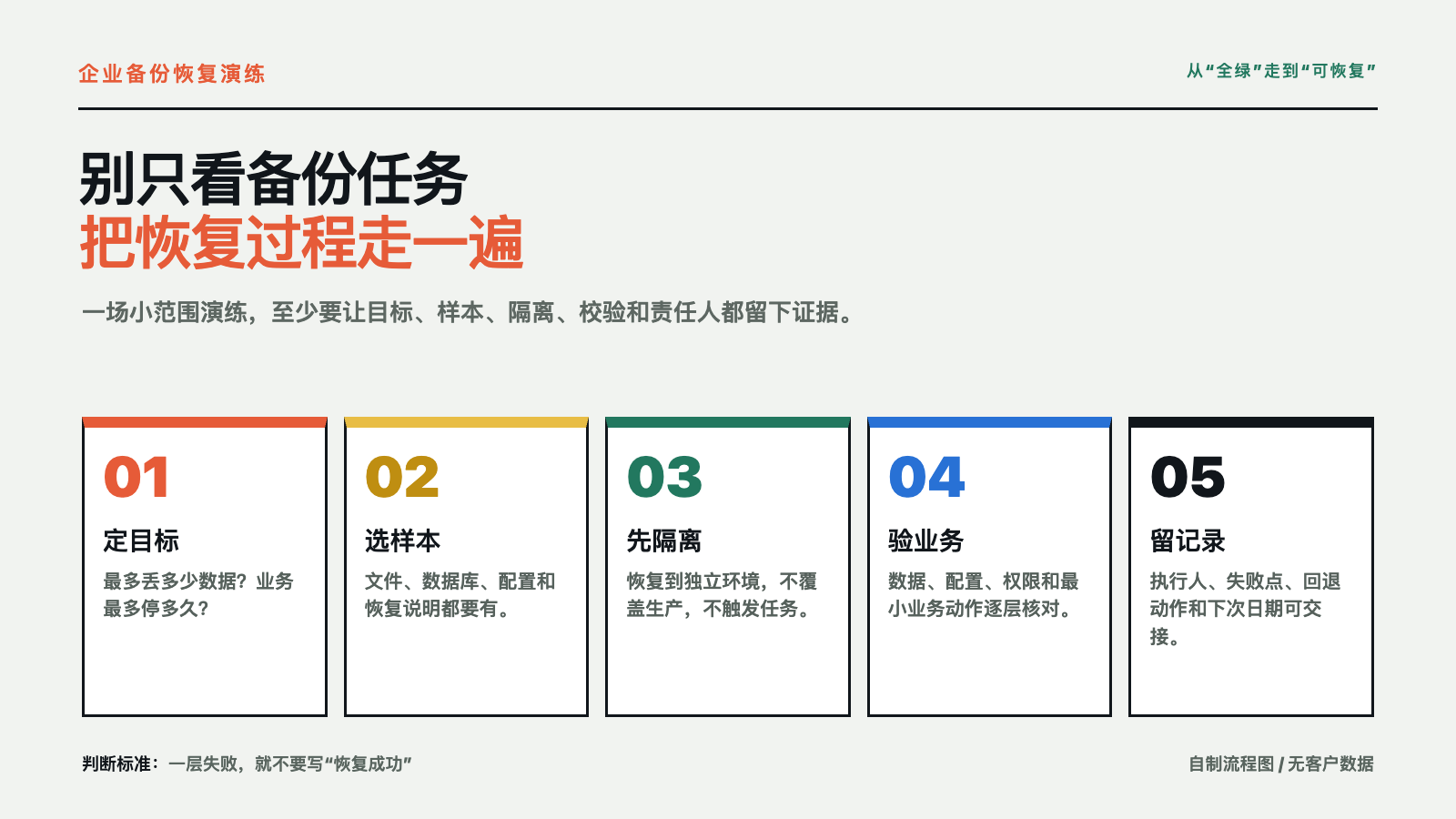
恢復演練不是把文件拷出來就結束。先寫兩個業務能看懂的目標:最多能接受丟失多長時間的數據,以及業務最多能中斷多長時間。前者通常對應 RPO,后者通常對應 RTO。它們不是設備的固定參數,而是企業根據訂單、財務、生產、客戶服務和人員可用性做出的取舍。
例如,共享資料可以接受恢復到昨天晚上,正在處理的訂單可能要求更近的時間點;同樣,單個文件恢復和整套業務系統恢復,也不是一個時間目標。沒有目標,備份頻率、保留周期、存儲位置和恢復方式就只能憑感覺配置。
只選一小組能驗收的樣本
第一輪不需要搬整個生產環境。選一組能代表實際業務的樣本:一個常用文件夾、一份需要恢復的數據庫備份、應用配置、網絡或虛擬化配置,以及一份恢復說明。樣本里要包含正常數據,也可以放少量格式異常、權限特殊或版本較舊的文件。
同時記下樣本的來源時間、備份版本、文件數量、關鍵字段和原有權限。這樣恢復后才有比較依據,不會只憑“文件能打開”就宣布通過。涉及客戶資料、合同或員工信息時,先按最小必要原則處理,盡量用脫敏樣本。
在隔離環境里恢復,不要直接碰生產
恢復演練應有明確的隔離環境、操作窗口和回退路徑。恢復出來的文件、數據庫或虛擬機先放在與生產不同的位置,確認不會覆蓋原數據,也不會因為網絡、賬號或自動任務重新影響生產。
演練前把參與人寫清楚:誰批準窗口,誰執行恢復,誰確認數據,誰判斷業務是否能繼續。NIST 的應急規劃資料把恢復步驟、人員責任和計劃測試都作為持續改進的一部分;對中小企業來說,至少要留下“誰在什么時間做了什么、結果是什么”的記錄。
驗收的不只是文件,還有業務鏈
恢復后按四層核對:
- 數據層。 文件數量、大小、版本、關鍵字段和校驗結果是否與樣本一致。
- 配置層。 應用配置、依賴服務、證書或任務計劃是否能被找到,缺失時是否有補救辦法。
- 權限層。 需要訪問的人能否訪問,不應訪問的人是否仍被擋住;不能為了“先跑起來”把權限全部放開。
- 業務層。 讓真正使用系統的人完成一條最小業務動作,例如查一條記錄、生成一份內部報表或走完一個審批,不要只讓 IT 看見服務啟動。
這四層有一層失敗,都不應該寫成“恢復成功”。可以記錄為“數據恢復通過、應用待修復”或“文件可用、權限待核對”,然后決定調整備份范圍、補充配置備份,還是重新設計恢復路徑。
演練結束要留下下一次能復用的記錄
至少保存:演練日期、恢復目標、樣本版本、執行人、驗收人、耗時、失敗點、回退動作和下一次復核日期。NIST 近期的備份指南也強調創建、測試和在恢復演練中復查備份。記錄不是為了做一份漂亮報告,而是為了讓負責恢復的人臨時不在場時,另一個人也能按步驟接手。
煜企可以圍繞企業現有的服務器、文件、數據庫或虛擬化環境,協助梳理關鍵數據清單、RPO/RTO 目標、備份范圍、隔離恢復環境、演練步驟和驗收記錄,形成可交接的恢復路徑。具體方案要以現有系統、數據變化、業務中斷承受能力和雙方確認的范圍為準,不承諾零停機或固定恢復時間。
如果你要先檢查企業備份是否真的能恢復,可查看煜企容災備份解決方案,從恢復目標和一組小樣本開始,而不是先數備份任務有多少條綠色記錄。
資料來源:NIST SP 1339《OT Backup Quick Start Guide》、NIST SP 800-34 Rev.1《Contingency Planning Guide》和 NIST NCCoE 備份文件保護與測試指南。本文是一般性的企業 IT 規劃信息,不構成具體災備審計或法律意見;文中沒有客戶實測數據或廠商背書。
]]>上海煜企智能科技有限公司 - IT弱電智能化系統集成整體解決方案提供商
Before connecting AI to a business workflow, define the outcome, capture the current baseline, map the handoffs and run a small pilot before deciding whether to scale.
]]>上海煜企智能科技有限公司 - IT弱電智能化系統集成整體解決方案提供商
Many enterprise AI projects stall not because the model is too weak, but because nobody defines three management decisions: what should improve, what the current baseline is, and how the team will return to the existing process if the pilot fails. After several model changes, the business still has no comparable result and can only decide by intuition.
This enterprise AI adoption plan is for owners, managers and IT decision-makers at small and midsize organizations in Shanghai and nearby areas. It does not start from a model leaderboard or treat a vendor demo as a business result. It turns “should we expand AI use?” into a decision sheet that a project owner can actually run.
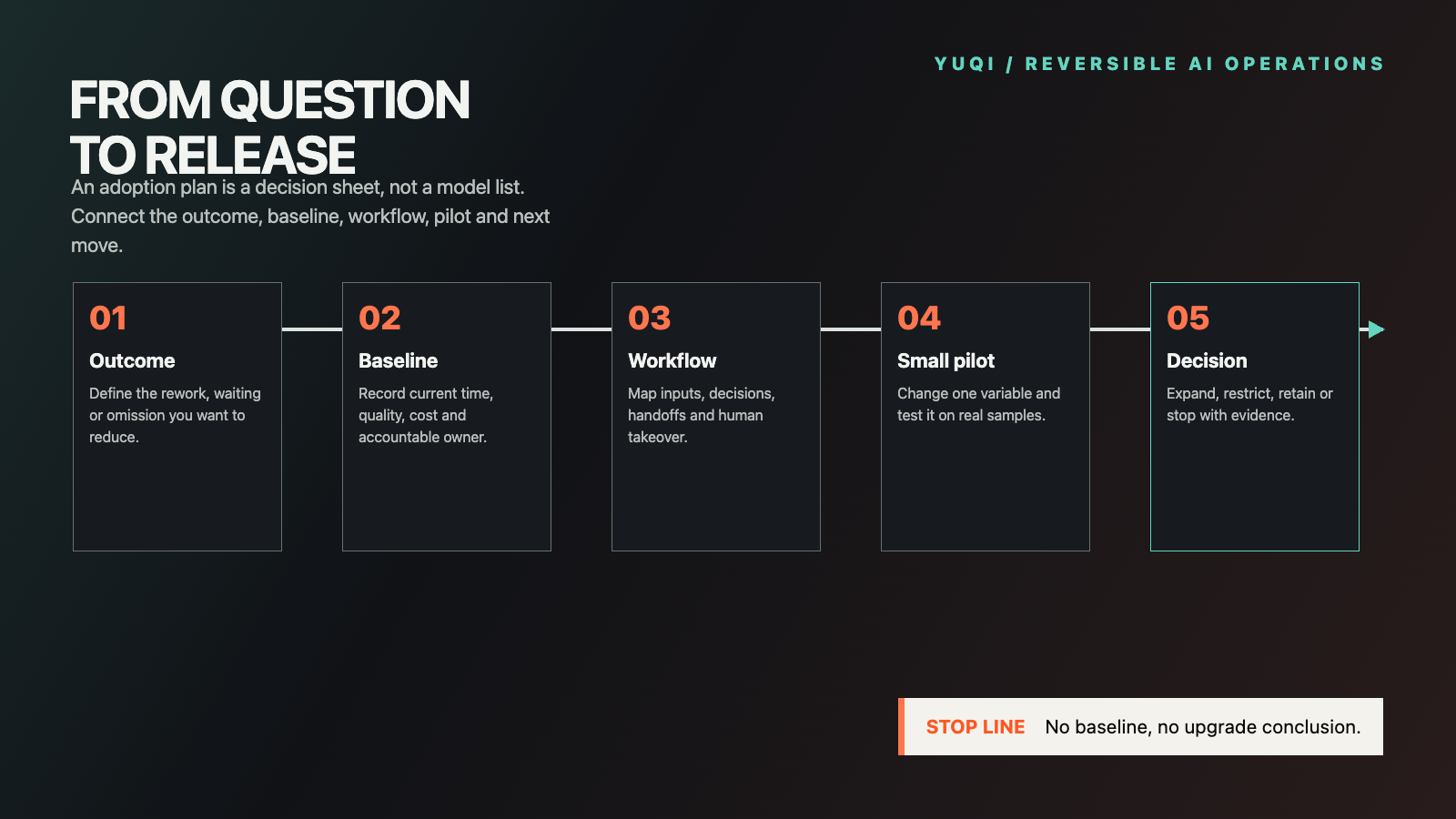
Define the business outcome before choosing a model
“We want to use AI” is not an implementation goal. A useful goal is visible to the business owner: reduce first-pass customer-service preparation time, deliver a sales draft sooner, shorten internal document searches, or remove repeated omissions from an IT inspection report.
Add three constraints to the goal: what must not be sacrificed, who judges the result, and when the next decision must be made. This keeps a project from becoming an indefinite trial based on “it feels convenient,” and prevents one awkward demo from disqualifying a useful workflow.
Capture the current baseline first
Keep at least one week of real process records: time per task, human edits, recurring errors, and where a person waits or reworks an item. Without a baseline, the team cannot distinguish an AI improvement from changes in workload or operator familiarity.
The first baseline does not need a complex data warehouse. For a small business project, task count, elapsed time, rework count, key-field accuracy and human review time are often enough to start a comparison. Minimize customer details, contracts and account identifiers according to the actual need; sanitize them before testing when possible.
Map the workflow to the next owner
Do not draw only “input → AI → output.” Mark where the material comes from, where a business decision occurs, who receives the result, which cases return to a person and which system stores the final outcome. A workflow may look automated while the real delay sits in confirmation and copy-paste handoffs.
Split the workflow into three layers: content AI can prepare directly, judgments an employee must confirm, and actions that remain outside AI for now. Data entry, system connections and account scope depend on the environment. Draw those boundaries before deciding whether integration or a new tool is necessary.
Run a small pilot instead of a company-wide trial
Keep the first round to one team, one workflow and one accountable reviewer. Prepare routine samples plus a small number of incomplete-input, formatting-error and human-intervention cases. Record several consecutive days rather than selecting only the best-looking outputs.
Change one major variable during the pilot: the model, the instruction set or one connected source. Record quality, rework, elapsed time, cost and human takeover. OpenAI’s Path to Astra treats monitoring and safeguards as part of deploying high-capability systems; for an enterprise, that is a reminder that “can demo” and “can operate” need an observable pilot between them.
End the pilot with one of four decisions
Do not close the trial with “the results look good.” Choose one outcome:
- Expand. The target measure improved, exceptions are manageable, and the owner approves more roles or tasks.
- Restrict. Use the workflow only for selected roles or low-risk steps, with human review retained.
- Adjust. The direction is valuable, but the data, process or input quality needs correction first.
- Stop. Rework does not decline, results cannot be reviewed consistently, or cost and risk exceed the acceptable range.
Attach samples, the baseline, the accountable owner and the next review date to the decision. Even a stopped project then leaves reusable evidence instead of an account that was “tried” but cannot be explained.
What Yuqi can deliver
When a company is unsure where to start, Yuqi can help turn one business chain into handoff-ready material: a current-state process map, data and system inventory, pilot scope, acceptance sheet, human handoff points and an expansion recommendation. We do not promise model savings. We make the verifiable parts clear and transferable before deciding whether system integration or ongoing operations are needed.
If you are planning an enterprise AI pilot, workflow review or system connection, use Yuqi’s enterprise AI adoption planning service to describe the current workflow, data scope, participating roles and desired outcome. The final scope depends on the environment and the work agreed by both parties.
Source: OpenAI Path to Astra. Prepared by Shanghai Yuqi Intelligent Technology Co., Ltd. with AI-assisted research, writing and official-source review. The diagram is a deterministic local technical graphic and contains no customer data, measured performance or vendor endorsement. Sources reviewed on September 14, 2026.
]]>上海煜企智能科技有限公司 - IT弱電智能化系統集成整體解決方案提供商
企業準備把 AI 接入業務流程時,先定義要改善的結果、保存現狀基線、拆解交接點,再用小范圍試點決定擴大、限定、調整或停止。
]]>上海煜企智能科技有限公司 - IT弱電智能化系統集成整體解決方案提供商
很多企業的 AI 項目不是卡在模型不夠強,而是卡在三個管理動作沒有人定:到底要改善什么、現在的流程基線是多少、試點失敗后怎樣回到原流程。模型換了幾次,業務卻沒有留下可比較的結果,最后只能憑感覺決定要不要繼續。
這份企業 AI 落地規劃面向上海及周邊中小企業的老板、管理者和 IT 決策者。它不從模型榜單出發,也不把供應商演示當作企業成果,而是把“要不要擴大使用”拆成一張可以交給項目負責人的決策表。
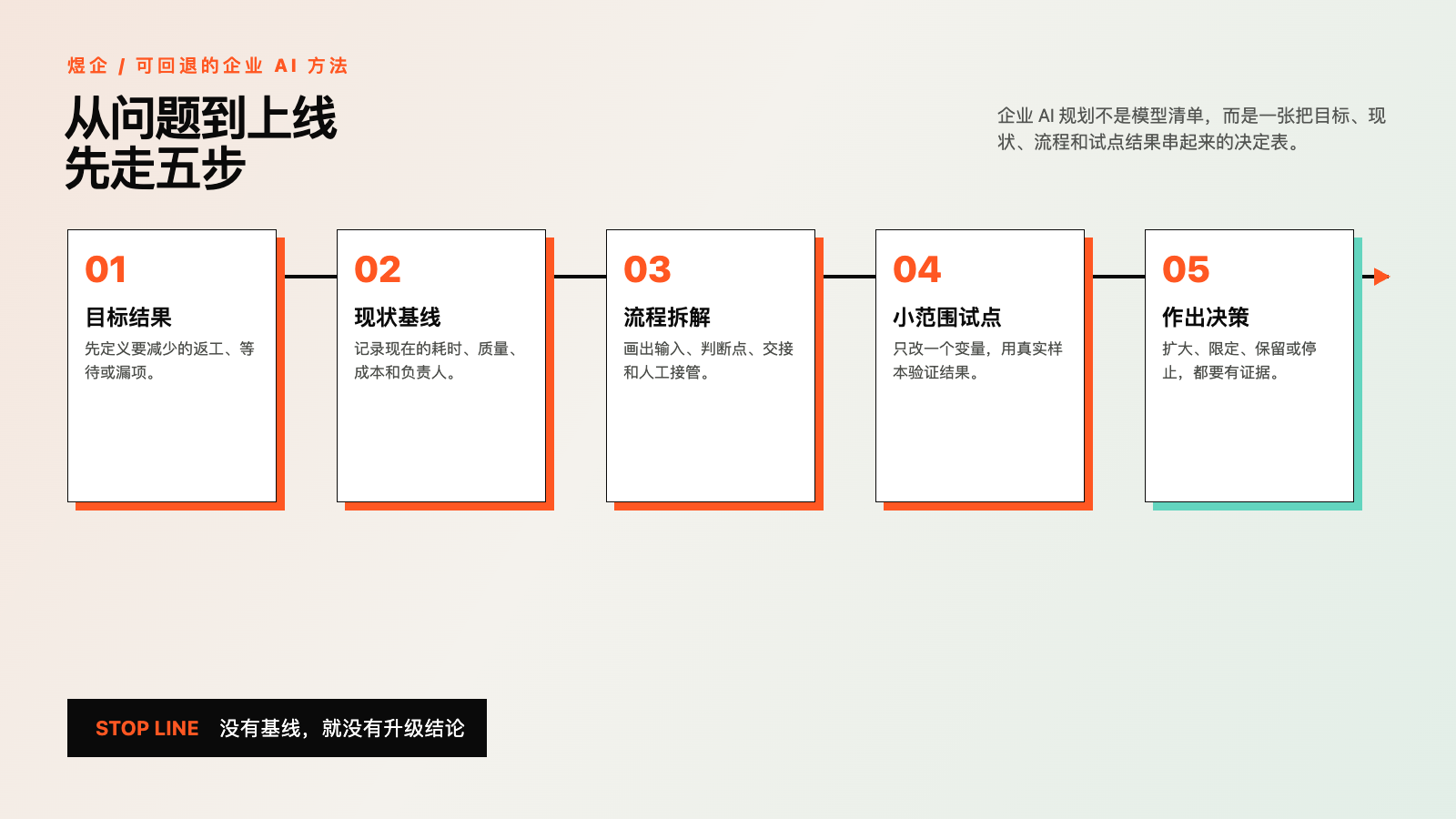
企業 AI 落地,先寫要改變的結果
“我們想上 AI”不是項目目標。目標應該能被業務負責人看見,例如:客服首輪整理時間減少、銷售方案初稿交付更快、內部資料查找少走幾次彎路,或 IT 巡檢報告少漏掉固定字段。
目標寫完后,補上三個限制:不能犧牲什么、誰來判斷結果、最晚什么時候作出下一步決定。這樣項目不會因為“大家都覺得挺方便”就無限期試用,也不會因為一次演示不順就誤判全部價值。
先保存現狀基線,再談提升
至少選一周的真實流程記錄:每件任務花多長時間、人工改了幾處、常見錯誤是什么、誰在中間等待或返工。沒有現狀基線,就無法區分 AI 帶來的改善和業務量變化、人員熟練度變化。
基線不必一開始就很復雜。對一個小企業項目,記錄任務數量、完成時間、返工次數、關鍵字段正確率和人工確認時間,通常已經足夠啟動第一輪比較。客戶資料、合同和內部賬號先按實際需要最小化,能脫敏就不帶原文進入測試。
把流程拆到“誰接下一步”
畫流程時不要只畫“輸入 → AI → 輸出”。還要標出資料從哪里來、哪一步需要業務判斷、結果交給誰、哪些情況必須回到人工、最終結果寫入哪個系統。很多項目看起來已經自動化,真正耗時的卻是等待確認和反復復制粘貼。
建議把流程分成三層:AI 可以直接整理的內容、必須由員工確認的判斷、暫時不讓 AI 參與的動作。數據入口、系統連接和賬號范圍隨環境而定,先把邊界寫進流程圖,再決定是否需要系統集成或新的工具。
用一個小試點驗證,而不是全員試用
把第一輪控制在一個部門、一個流程和一位明確的驗收人。準備一組日常樣本,再加入少量信息不完整、格式異常和人工必須介入的樣本;連續記錄幾天,不要只截取最好看的結果。
試點期間只改變一個主要變量,例如只換模型、只改提示詞或只接入一個資料庫。每次記錄質量、返工、耗時、成本和人工接管次數。OpenAI 的 Path to Astra也把高能力系統的監測與安全措施作為部署的一部分;對企業來說,這意味著“能演示”與“能運營”之間必須有一段可觀察的試點。
用四種結果結束試點
試點結束時,不要只寫“效果不錯”。把結論固定為四種之一:
- 擴大。 目標指標改善,異常可處理,負責人同意增加崗位或任務范圍。
- 限定。 只在少數崗位或低風險步驟使用,保留人工確認。
- 調整。 價值方向成立,但數據、流程或輸入質量需要先修正。
- 停止。 返工沒有下降、結果無法穩定復核,或成本與風險超過可接受范圍。
每種結論都要附樣本、基線、負責人和下一次復核日期。這樣項目即使停止,也留下了可以復用的判斷依據,而不是留下一個“試過但說不清”的賬號。
煜企可以交付什么
企業如果不確定從哪個流程開始,煜企可以圍繞一條具體業務鏈協助整理:現狀流程圖、數據與系統清單、試點范圍、驗收表、人工交接點和后續擴展建議。我們不替企業承諾模型收益,先把可驗證的部分做成可交接的項目資料,再決定是否進入系統集成或長期運維。
如果你正在規劃企業 AI 試點、流程梳理或系統接入,可以通過煜企企業 AI 落地規劃服務入口說明當前流程、數據范圍、參與崗位和希望改善的結果。具體方案以現場條件和雙方確認的服務范圍為準。
資料來源:OpenAI Path to Astra。本文由上海煜企智能科技有限公司原創整理,AI 輔助研究與寫作并進行官方來源核對;圖片為本機確定性技術圖,不含客戶資料、實測成績或廠商背書。資料核對日期:2026 年 9 月 14 日。
]]>上海煜企智能科技有限公司 - IT弱電智能化系統集成整體解決方案提供商
Before enabling GPT-6 Astra broadly, compare ten real tasks across quality, rework, time, cost and authorization, then choose a limited rollout, expansion or rollback.
]]>上海煜企智能科技有限公司 - IT弱電智能化系統集成整體解決方案提供商
When a new model arrives, an organization can easily enable it broadly and decide to measure the outcome later. That order makes the result hard to interpret. Without a current-model baseline, representative samples, authorization boundaries and stop conditions, the team cannot distinguish genuine improvement from longer outputs, more retries or additional review work.
This GPT-6 Astra enterprise upgrade checklist is for owners, managers and IT leads at small and midsize organizations in Shanghai and nearby areas. It describes a limited and reversible evaluation. It does not claim that every organization should upgrade, and it does not treat vendor benchmarks as evidence of a business outcome.
Confirm availability, administrator control and price
OpenAI’s GPT-6 Astra launch page says that access is rolling out in phases across ChatGPT plans and API channels. Enterprise access is off by default at launch and must be enabled by an administrator. The API model name is gpt-6-astra; standard API pricing is listed as USD 10 per million input tokens and USD 50 per million output tokens.
These facts describe the service, not your rollout decision. Before any trial, confirm whether the workspace has access, who is allowed to participate, what data may be supplied and which actions still require human approval. Payments, deletion, external messages and account changes should not inherit authority simply because the model is more capable.
OpenAI’s GPT-6 Astra safety overview classifies the model at the Critical level for cybersecurity capability and describes additional safeguards. For an enterprise, stronger computer-use and tool-use capability increases the importance of least privilege, approval and reliable post-action readback.
Start with three reversible tasks
Do not begin by changing the default model for the entire workforce. Choose three frequent tasks that are easy to review and safe to reverse, such as drafting a customer-service response, assembling an operations report, or producing a read-only IT check summary. Preserve the result from the current model as the baseline for each task.
Change only the model during a comparison. Keep the source material, instructions, output format, tool permissions and reviewer constant. Otherwise, an apparent improvement may come from a different prompt, document version or reviewer rather than the model.
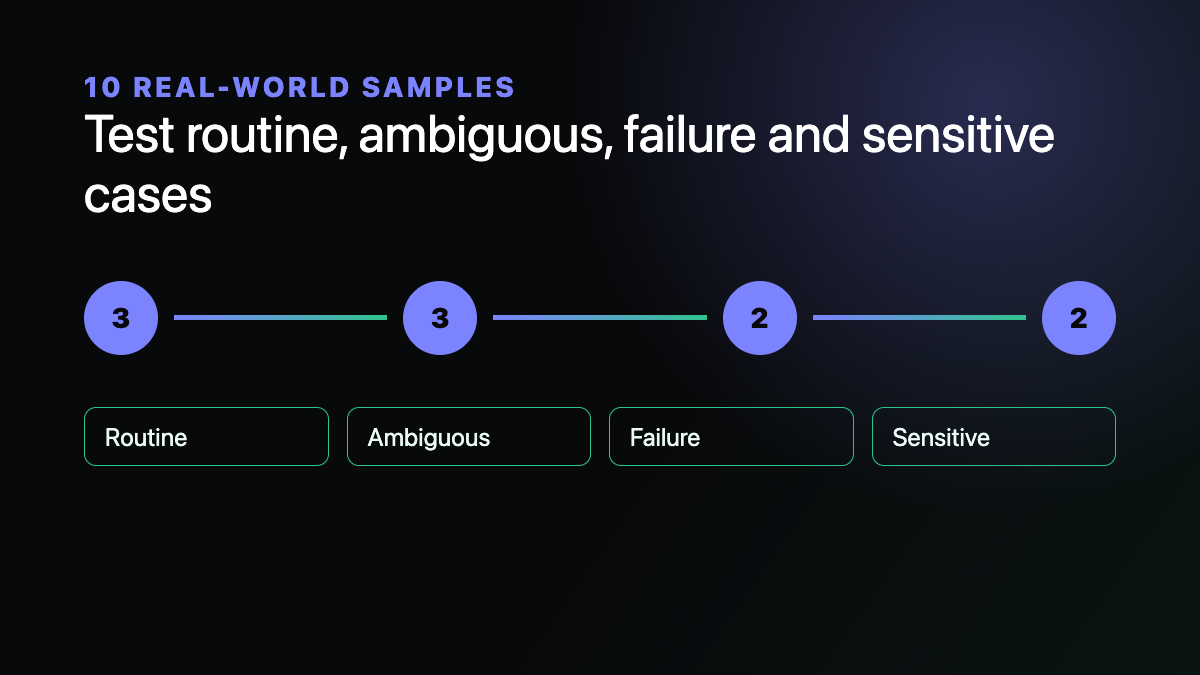
Build a ten-sample set for each trial task:
- Three routine samples to assess factual accuracy, format and completeness.
- Three ambiguous samples to see whether the model invents missing details or asks for clarification.
- Two failure samples with missing input, damaged formatting or unavailable tools.
- Two sensitive samples that test whether customer data or high-impact actions trigger human approval.
Remove information that is not needed for the test. A polished demonstration covers the happy path; it does not replace failure and authorization testing.
Measure quality, rework, time and authorization
Quality requires field-by-field review of facts, numbers, formatting, references and required elements. A fluent answer is not automatically a correct answer. Contracts, quotations, customer commitments and system actions still need the accountable owner to confirm them.
Rework should record how many edits a reviewer makes, where they occur and why. A longer answer that requires more deletion is not an efficiency improvement. Repeated errors in one field may indicate that the input structure or workflow needs correction before access expands.
Time and cost include model runtime, retries, human verification and coordination. Published API prices are only a starting point. Long context, long output, caching choices and repeated attempts all change the actual cost. Use your own usage and labor records rather than extrapolating savings from another organization’s case.
Authorization is a release gate. A tool should receive only the authority needed for the specified task. A visible button, a proposed action or a workflow that has reached its final step is not authorization to pay, delete, send or change account settings. If the result cannot be read back, record the state as unknown or blocked.
Define stop and rollback conditions first
Set the stopping rules before the trial begins. Pause when factual error exceeds the accepted business threshold, output formatting remains unstable, human rework does not decline, cost exceeds the agreed limit, or a task reaches data or actions outside its authorization.
A phased rollout also means that some accounts may not see the model immediately. An unavailable model, uncertain administrator setting or unknown submission state should not trigger repeated refreshes or clicks. Confirm the platform state before continuing.
After the samples are reviewed, choose one of four outcomes: expand the trial, restrict use to selected roles, keep the current model, or stop and redesign the workflow. Attach the samples, measures and accountable reviewer to that decision.
A handoff checklist for the project owner
- List the three trial tasks, permitted actions, prohibited actions and reviewers.
- Preserve the sanitized samples, current-model baseline, new-model outputs and edits.
- Record quality issues, rework, elapsed time, usage, cost and authorization exceptions.
- Define the conditions for expansion, role-limited use, retaining the current model and rollback.
- Keep the decision, unresolved issues and the next review date after the trial.
To turn an enterprise AI model trial into a traceable and reversible operating process, use Yuqi’s project enquiry form to describe the current tasks, tools, data scope and approval requirements. The service scope depends on the environment and the work agreed by both parties.
Prepared by Shanghai Yuqi Intelligent Technology Co., Ltd. with AI-assisted research and source review. The diagrams are original deterministic technical graphics and contain no customer data, measured performance or vendor endorsement. Sources reviewed on September 7, 2026.
]]>上海煜企智能科技有限公司 - IT弱電智能化系統集成整體解決方案提供商
企業準備啟用 GPT-6 Astra 時,先選三個可回退任務,用十條真實樣本比較質量、返工、時間、成本與權限,再決定擴大、限定崗位或保持原模型。
]]>上海煜企智能科技有限公司 - IT弱電智能化系統集成整體解決方案提供商
當老板看到 GPT?6 Astra 發布,企業內部最容易出現的動作是:先開放給所有人,再慢慢看效果。這樣做的問題不是員工不會使用,而是原模型基線、真實樣本、權限邊界和停止條件都沒有留下,幾天后很難說明升級究竟減少了返工,還是只增加了更長的輸出和新的調用費用。
這份 GPT?6 Astra 企業升級評估清單面向上海及周邊中小企業的老板、管理者和 IT 負責人。它提供一個可回退的小范圍試點方法,不代表每家企業都應升級,也不把廠商基準當作企業業務驗收結果。
先確認開放范圍、管理員決定和價格
OpenAI 的 GPT?6 Astra 發布頁說明,該模型采用分階段開放方式,并將覆蓋 ChatGPT Plus、Pro、Business、Enterprise 以及 API 等渠道。企業工作區在發布時默認關閉,需要管理員主動啟用。對于開發者,API 模型名為 gpt-6-astra,標準價格為每百萬輸入 Token 10 美元、每百萬輸出 Token 50 美元。
這些信息能回答“平臺提供了什么”,但不能直接回答“你的企業應該給誰開放”。正式試點前,先由管理員確認工作區是否已經獲得使用資格、哪些崗位可以進入試點、哪些數據不能輸入,以及付款、刪除、對外發送和賬號設置等高影響動作是否仍由人工審批。
OpenAI 同時發布了 GPT?6 Astra 安全說明,并將其網絡安全能力列為 Critical。企業在評估更強的計算機操作或工具使用能力時,應同步收緊授權范圍、保留審批和回讀,而不是把能力提升理解為可以取消責任邊界。
從三個可回退任務開始
試點不從“全員模型默認值”開始。先從三個頻率高、容易復核、失敗后可撤回的任務中各選一個,例如客服答復草稿、運營周報整理、IT 只讀巡檢摘要。每項任務都保存舊模型結果作為基線。
一次比較只改變模型。輸入材料、提示規則、輸出格式、工具權限和驗收人應保持一致。否則,結果變化可能來自不同提示詞、不同資料版本或不同人員,而不是模型本身。
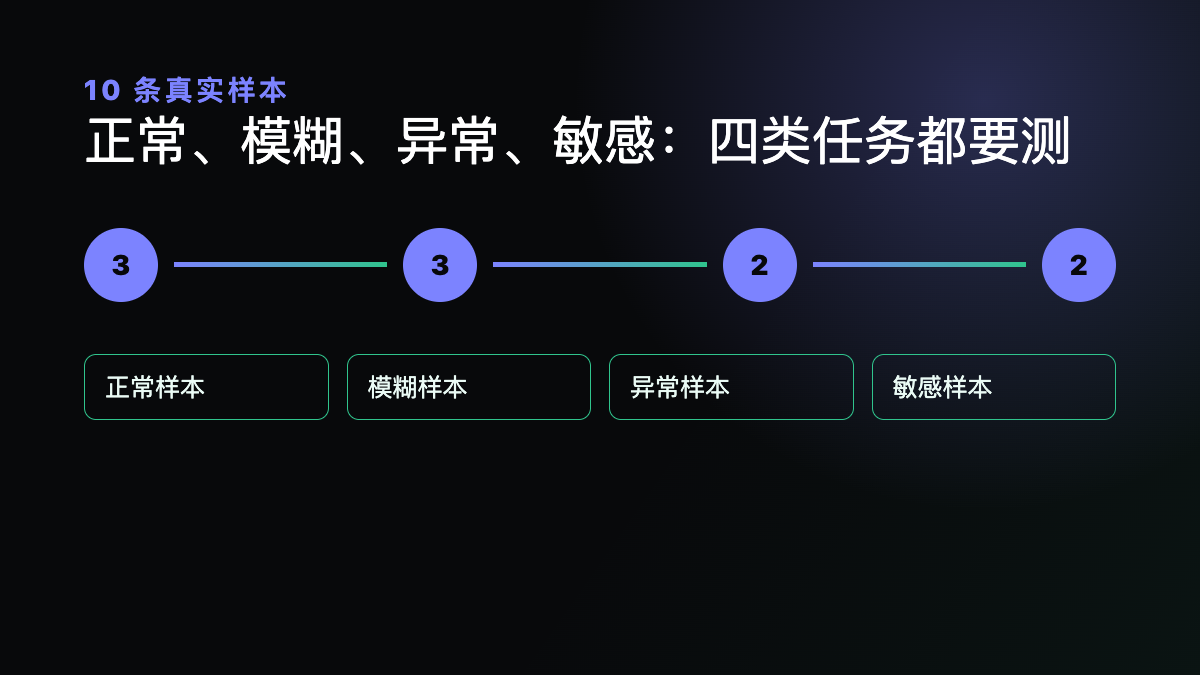
建議為三個任務各準備一組十條真實樣本:
- 三條正常樣本。 檢查事實、格式、必要字段和完整性是否穩定。
- 三條模糊樣本。 觀察模型是否會擅自補充信息,還是會提出需要確認的問題。
- 兩條異常樣本。 輸入缺失、格式損壞或工具不可用時,檢查模型能否停下并說明阻塞。
- 兩條敏感樣本。 檢查客戶資料、賬號權限、付款、刪除和外發等動作是否觸發人工審批。
樣本必須先去除不需要的客戶信息、賬號標識和其他敏感內容。演示稿只覆蓋正常路徑,不能替代異常和權限測試。
用質量、返工、時間成本與權限做驗收
質量不能只看語言是否更自然。應逐條核對事實、數字、格式、引用和必要字段,并記錄錯誤類型。對于合同、報價、客戶承諾和系統操作,仍要由對應負責人確認。
返工要記錄人工修改次數、位置和原因。新模型輸出更長,但人工需要刪掉更多內容,不應被記為效率提升。相反,如果錯誤集中在固定字段,也可以先調整流程或輸入結構,而不是立刻擴大開放范圍。
時間與成本要同時計算模型運行、反復重試、人工復核和溝通時間。官方 API 單價只是預算起點;長上下文、長輸出、緩存方式和重試次數都會影響實際費用。企業應使用自己的調用和工時記錄,不用他人案例推算收益。
權限是上線門檻。工具調用只能獲得完成任務所需的最小權限;屏幕上出現一個按鈕、模型提出一個動作或任務已經進行到某一步,都不等于獲得付款、刪除、發送或改賬號設置的授權。無法回讀結果時,狀態應記為未知或阻塞。
先寫停線和回退條件
試點開始前約定何時停止:事實錯誤超過業務可接受范圍、輸出格式持續不穩定、人工返工沒有下降、費用超過預算線、任務觸碰未授權數據或動作,任何一項都應觸發暫停和復盤。
分階段開放也意味著某些賬號暫時看不到模型。遇到權限未開、頁面狀態不明或提交結果未知時,不應靠連續刷新和重復點擊來“確認”。管理員應先查清平臺狀態,再決定是否繼續。
完成十條樣本后,只做四選一:擴大試點、限定崗位使用、保持舊模型、停止并調整流程。決定應附帶樣本、指標和負責人簽字,而不是只寫“大家反饋不錯”。
可交給負責人的升級任務單
- 記錄三個試點任務、允許動作、禁止動作和驗收人。
- 保存十條脫敏樣本、舊模型基線、新模型輸出與人工修改記錄。
- 回填質量問題、返工次數、完整耗時、調用量、費用和權限異常。
- 寫明擴大、限定崗位、保持原模型和回退的判定條件。
- 試點結束后保留結論、未解決問題和下一次復核日期。
如果你需要把企業 AI 模型試點整理為可回讀、可回退的流程,可通過煜企項目需求溝通入口說明當前任務、工具、數據范圍和審批要求。具體方案以現場條件和雙方確認的服務范圍為準。
本文由上海煜企智能科技有限公司整理,AI 輔助研究與寫作并進行官方來源核對;圖片為原創確定性技術圖,不含客戶數據、實測成績或廠商背書。資料核對日期:2026 年 9 月 7 日。
]]>